
BuddhistCatholicContemplativeEvangelicalGeneral ChristianHinduJewishLatter-day SaintMuslimNew VisionsProgressive Christian
Beliefs
- Buddhist
- Catholic
- Contemplative
- Evangelical
- General Christian
- Hindu
- Jewish
- Latter-day Saint
- More Voices
- Muslim
- New Visions
- Pagan
- Progressive Christian
Topics
- Religion News
- Food and Religion
- Sports and Religion
- Religious Art
- Religious Music and Entertainment
- Religious Events
- History and Religion
- Style and Religion
- Politics and Religion
- Women in Religion
- Recreation Outdoors and Religion
- Business Finance and Religion
- Careers Workplace and Religion
- Education and Religion
- Family Parenting and Religion
- Health Fitness and Religion
- Home and Religion
- Relationships and Religion
- Technology and Religion
- Travel and Religion
Columnists
- Buddhist Columnists
- Business Finance and Religion Columnists
- Careers Workplace and Religion Columnists
- Catholic Columnists
- Contemplative Columnists
- Education and Religion Columnists
- Evangelists Columnists
- Family Parenting and Religion Columnists
- General Christian Columnists
- Health Fitness and Religion Columnists
- Hindu Columnists
- History and Religion Columnists
- Home and Religion Columnists
- Jewish Columnists
- More Voices Columnists
- Latter Day Columnists
- Muslim Columnists
- New Visions Columnists
- Nonreligious Columnists
- Pagan Columnists
- Politics and Religion Columnists
- Progressive Columnists
- Recreation Outdoors and Religion Columnists
- Relationships and Religion Columnists
- Religion News Columnists
- Religious Art Columnists
- Religious Events Columnists
- Religious Music and Entertainment Columnists
- Sports and Religion Columnists
- Style and Religion Columnists
- Technology and Religion Columnists
- Travel and Religion Columnists
- Women in Religion Columnists
Resource Library
- 2026 Calendar
- Library of World Religions
- The 100 Most Holy Places on Earth
- Patheos Answers
- Podcasts
- Videos
- Faith Leaders Database
- Anglican Episcopalian
- Bahai
- Baptist
- Buddhism
- Christianity
- Confucianism
- Eastern Orthodoxy
- Hinduism
- Holiness and Pentecostal
- ISKCON
- Islam
- Judaism
- Lutheran
- Methodist
- The Church of Jesus Christ of Latter-day Saints
- New Age
- Paganism
- Presbytarian and Reformed
- Protestantism
- Religion Behind the Scenes
- Roman Catholic
- Scientology
- Shia Islam
- Sikhism
- Sufism
- Sunni Islam
- Taoism
- Zen
- See all religions
Research Tools
 Ad-Free & Subscriber Log-In Subscription Support
Ad-Free & Subscriber Log-In Subscription Support
Follow Patheos 

- Trending:
- Forgiveness
- |
- Marriage
- |
- Consciousness
- |
- Death Penalty
- |
- Election
- |
- Halloween

- Home
- Religious Music and Entertainment
- Personalizing Your Facebook News Feed
Personalizing Your Facebook News Feed
Last updated on: October 4, 2012 at 7:54 am by DeWayne Hamby
Personalizing Your Facebook News Feed 2012-10-04T07:54:00-04:00 DeWayne Hamby
Patheos Explore the world's faith through different perspectives on religion and spirituality! Patheos has the views of the prevalent religions and spiritualities of the world.

For a while, I’ve meant to write a short tutorial on de-cluttering Facebook news feeds. With last night’s Presidential debate still so fresh in my mind and hearing social media feedback, perhaps there’s no better time than the present.
Full disclosure: I realize I am a chief of the political posters, perhaps because I feel that the direction the country is headed is at least as important as what we made for dinner or how lousy your day is going. I think a debate is also one good chance you have to live-blog, because no one is watching it time-delayed on the west coast and there are no spoiler warnings.
In recent months, I have also become aware of frustration of friends who struggle with the need to be authentic but also have Facebook friends they feel they cannot be authentic with (this is understandable, because there are things such as a circles of relationships). If you want to clean up your feed or make your Facebook more personal, but you don’t want to lose friends or hide anyone, this is the best way I have found.
Create a List. I did that a long time ago because I realized I was missing some of my best friends’ postings because of my feed being cluttered with postings from people I barely knew. I added the acquaintances to groups I didn’t check quite as often, leaving my feed free for my friends’ postings.
So here’s how you de-clutter:
1. On the left toolbar, go to “Friends” and it will take you a page such as this:

2. Click on the tab “Create List” and name it something. I have names such as “PRC” (for the friends who attend my church), “Florida” (for the friends I made when I lived in Orlando), “Listeners” (for people I’m not quite sure I know), etc. You may want to put one as “Politics.” Here’s another idea—you live on the West Coast and you don’t like TV spoilers? Create a list of “Spoilers.” Next, I’m going to tell you what to do after you’ve created the list.
3. Add friends to the list they belong to. The worst political post offenders (it’s spelled “DeWayne” with an “e”)? Add them to the Politics list. Add family to a Family list. Facebook automatically creates some lists for you, such as Close Friends, Acquaintances and places you’ve worked. I’m going to use my lovely wife as an example. When you hover over a friend’s name, this will pop up.
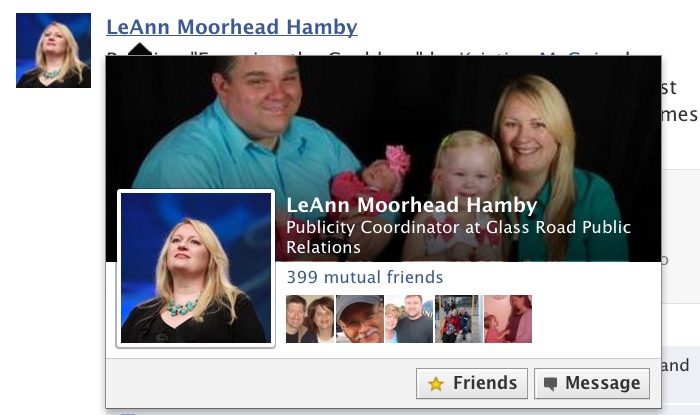
You notice she has a gold star, because she is in my Close Friends list. When you hover on that category (most of yours will say “Friend”), there will be another pop up like this:
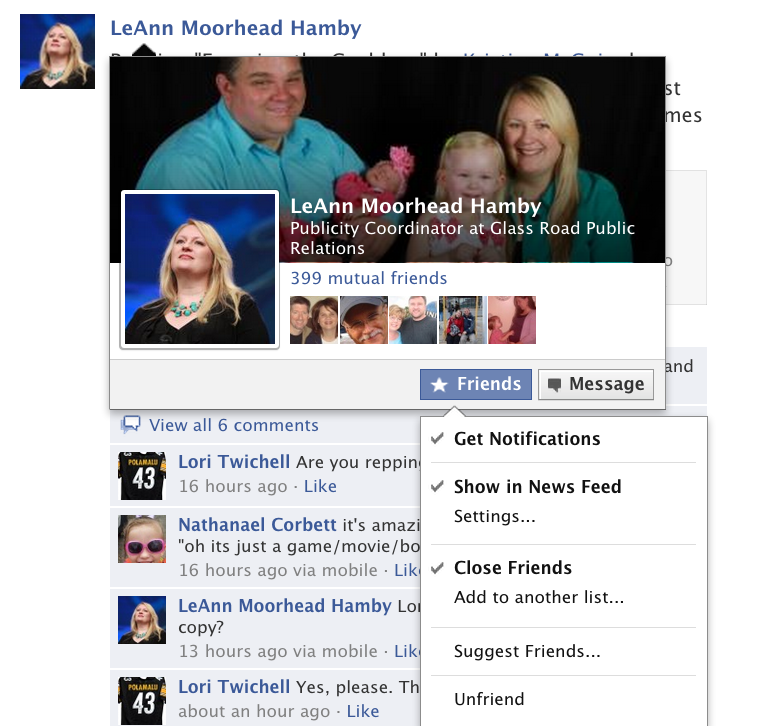
The checkmarks mean that LeAnn is a Close Friend, that she shows up in my News Feed and I receive notifications from her. If she was one I wanted to put in another group, I would click “Add to another list” and designate it. Then, if I wanted to pull her postings from my news feed (of course, I would never for my wife), I would simply uncheck the “Show in News Feed” designation. Her posts will be waiting in whatever group I assign her to. If she’s political and I don’t want to hear it, I add her to the Politics group, uncheck the “Show in News Feed” category and now I only see her posts when I go to that Politics group.
4. Find the group. To get to a particular group of friends or List, it will either show up on the left side toolbar or you will click “Friends” again and it will take you to the main group page, giving individual counts for new posts and activity. Here’s what it looks like on the left side for some of my more important groups to keep up with:
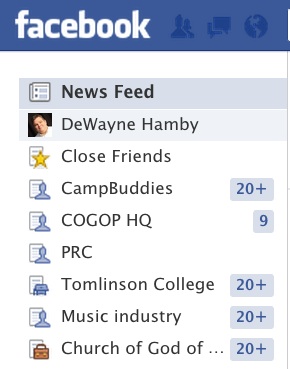
These are lists that I’ve “Added to Favorites.” You can do that by hovering on the left side of the list and the pop up will allow you to do it. I believe Close Friends is automatically at the top along with your News Feed and your own profile.
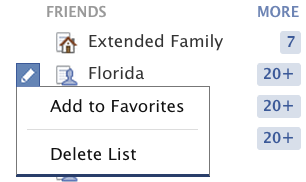
5. You can make your posts specific to groups. If you’re only targeting your work friends, you can do that very easily in your status update. You can target only your Close Friends. Your close friends are the ones who know you best, know your humor and don’t get offended or argumentative quite as easily (if they are, you might find yourself some new close friends). When you go to your status update, hover over the “Friends” category:
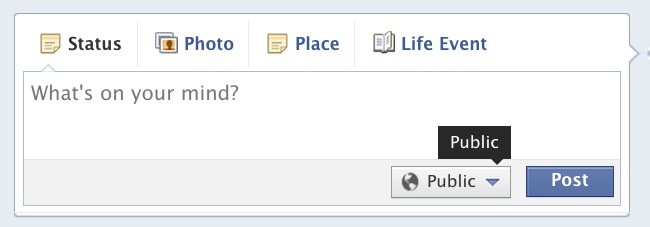
The default is public on mine. But when I click that button, it opens up like this:
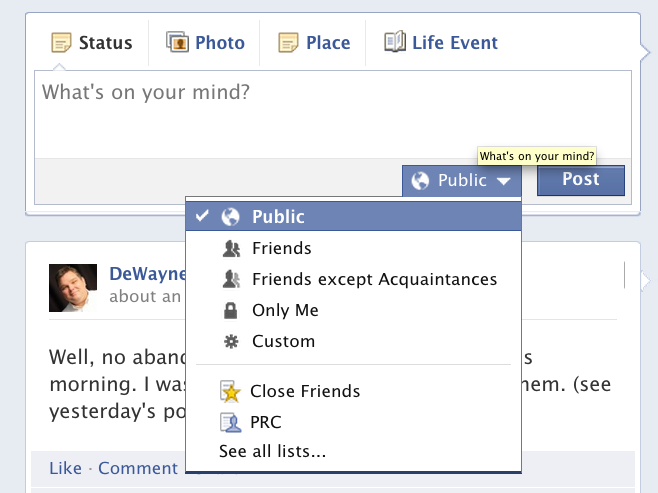
Then you can designate away. I have used “Custom” so I could do two or more different groups while leaving some other groups or individuals out. I have even told my staff members how to do this, in the event they wanted to post something they don’t necessarily want me to read. Because I do think there’s a place for letting your hair down with people who “get” what you’re saying.
To me, the lists feature, more than anything, helps bring Facebook back around to being a little more intimate and personal, as it was in the beginning when everyone had not discovered it. I love being connected to all my friends, but being able to place them in different categories gives me the freedom to be more authentic.
If you’ve considered giving up Facebook (as some of my friends recently have), I strongly encourage you to try these tools before you walk away. I still believe it’s a great tool to help people stay connected.
If you have questions or comments, please let me know in the comments section. You can also email me.
Previous Post

October 3, 2012
Movie Preview: "The Lone Ranger"
Next Post
October 10, 2012 Chynna Phillips & My Earlobes
Browse Our Archives
Select a Category Comics Movies Music Plays and Musicals Podcasts Television Uncategorized
Select a Month October 2026 September 2026 August 2026 July 2026 June 2026 May 2026 April 2026 March 2026 February 2026 January 2026 December 2025 November 2025 October 2025 September 2025 August 2025 July 2025 June 2025 May 2025 April 2025 March 2025 February 2025 January 2025 December 2024 November 2024 October 2024 September 2024 August 2024 July 2024 June 2024 May 2024 April 2024 March 2024 February 2024 January 2024 December 2023 November 2023 October 2023 September 2023 August 2023 July 2023 June 2023 May 2023 April 2023 March 2023 February 2023 January 2023 December 2022 November 2022 October 2022 September 2022 August 2022 July 2022 June 2022 May 2022 April 2022 March 2022 February 2022 January 2022 December 2021 November 2021 October 2021 September 2021 August 2021 July 2021 June 2021 May 2021 April 2021 March 2021 February 2021 January 2021 December 2020 November 2020 October 2020 September 2020 August 2020 July 2020 June 2020 May 2020 April 2020 March 2020 February 2020 January 2020 December 2019 November 2019 October 2019 September 2019 August 2019 July 2019 June 2019 May 2019 April 2019 March 2019 February 2019 January 2019 December 2018 November 2018 October 2018 September 2018 August 2018 July 2018 June 2018 May 2018 April 2018 March 2018 February 2018 January 2018 December 2017 November 2017 October 2017 September 2017 August 2017 July 2017 June 2017 April 2017 March 2017 February 2017 January 2017 December 2016 November 2016 October 2016 September 2016 August 2016 July 2016 May 2016 April 2016 March 2016 February 2016 September 2015 July 2015 March 2015 November 2014 September 2014 December 2013 November 2013 October 2013 September 2013 August 2013 May 2013 February 2013 January 2013 December 2012 October 2012 September 2012 August 2012 June 2012 May 2012 April 2012 February 2012 December 2011 November 2011 August 2011 July 2011 March 2011 May 2010 April 2010 March 2010 February 2010 January 2010 December 2009 November 2009 October 2009 September 2009 August 2009 July 2009 June 2009 May 2009 April 2009 March 2009 February 2009 January 2009 December 2008 November 2008 October 2008 September 2008 August 2008 July 2008 June 2008 May 2008 April 2008 March 2008 February 2008 April 2006 February 2006 December 2005 October 2005 September 2005 July 2005 June 2005 May 2005 April 2005 February 2005
Follow Us!
TAKE THE
Religious Wisdom Quiz
True or False: Romans teaches that all Israel will be saved.
Select your answer to see how you score.
TRUE FALSE
Related posts from Reel Faith

57th Dove Awards Honor Dolly Parton, Crown New...

‘Conceivable’ Opens Friday: Faith, Family & a Surprise...

WATCH: New 'The Chosen' Trailer Depicts Final Hours...

Narnia Trailer Revealed: Gerwig, Streep & Led Zeppelin
TRENDING AT PATHEOS Religious Music and Entertainment
Letters on Living the Faith by C.S. Lewis
Most of us met C.S. Lewis as a public intellectual. Mere Christianity....

When Halloween Unmasks Married Hearts
Written by Dr. David K. Ewen from Eternal Truth Bible College Behind...

Aristotle. He’s been called the father of logic, the father of the...

Methodist Central Hall and Westminster Abbey
Situated on the same square is Methodist Central Hall and Westminster Abbey. ...

57th Dove Awards Honor Dolly Parton, Crown New...
On gospel music’s biggest night, the 57th annual GMA Dove Awards honored...

The First Eucharistic Controversy: Christ’s Real Presence
For Catholics, the Eucharist is the source and summit of the Christian...
view all Religious Music and Entertainment blogs
Ad-Free & Subscriber Log-In Subscription Support
- About Us
- 2026 Calendar
- Videos
- Podcasts
- Library of World Religions
- Faith In Media Tracker
- Advertise With Us
- Write for Us
- Privacy Policy
- Terms of Service
- Do Not Sell My Data
- Contact Us
- Radiant Digital
- Manage Newsletter Subscriptions
- Unsubscribe From Notifications
- Sitemap
Copyright 2008-2026, Patheos. All rights reserved.
Subscription Support Ad-Free & Subscriber Log-In
Follow Patheos